Print from anywhere. Pages come out only when you're at the printer.
AnyTimePrint Enterprise lets your people send documents from their phone or laptop, walk to any office printer and scan its QR code. No print drivers on laptops, no confidential pages left in the tray, and a clear record of who printed what.
Works with the printers you already have.
The office printer is where documents leak
Every office prints things that shouldn't be left lying around. With a normal shared printer, pages come out the moment someone clicks Print, whether they're at the printer or not.
Pages nobody picks up
Salary slips, offer letters, KYC copies and contracts sit in the tray until someone else reads them, or bins them.
Drivers on every laptop
IT installs and fixes printer drivers, queues and ports on every machine, and does it again for every new joiner and every new printer.
No idea who printed what
Paper and toner are a real cost, but most offices can't say which team prints what, or stop a 500-page job before it starts.
Visitors and contract staff can't print
Guests, interns and vendor staff email files to someone with printer access, and that person prints it for them.
Same printer. Very different tray.
Flip between a normal shared printer and the same printer with AnyTimePrint.
Five pages printed in the last hour. Two people never came to collect theirs.
How it works
Three steps for your people. No app to install, no drivers, no training session.
Send it from any phone or laptop
Open the AnyTimePrint web app, pick a PDF, a photo or a Word, PowerPoint or Excel file, then choose pages, copies, colour and double-sided. Credits are held, not charged.
Walk to any printer in the office
The document waits securely in the cloud. Nothing prints yet, so nobody else can pick it up.
Scan the QR code on the hub
The phone camera opens the release page, the person confirms, and the pages come out in seconds. Credits are charged only for what actually prints; failures are refunded automatically.
What your people and admins see
Built for the three people who care about printing
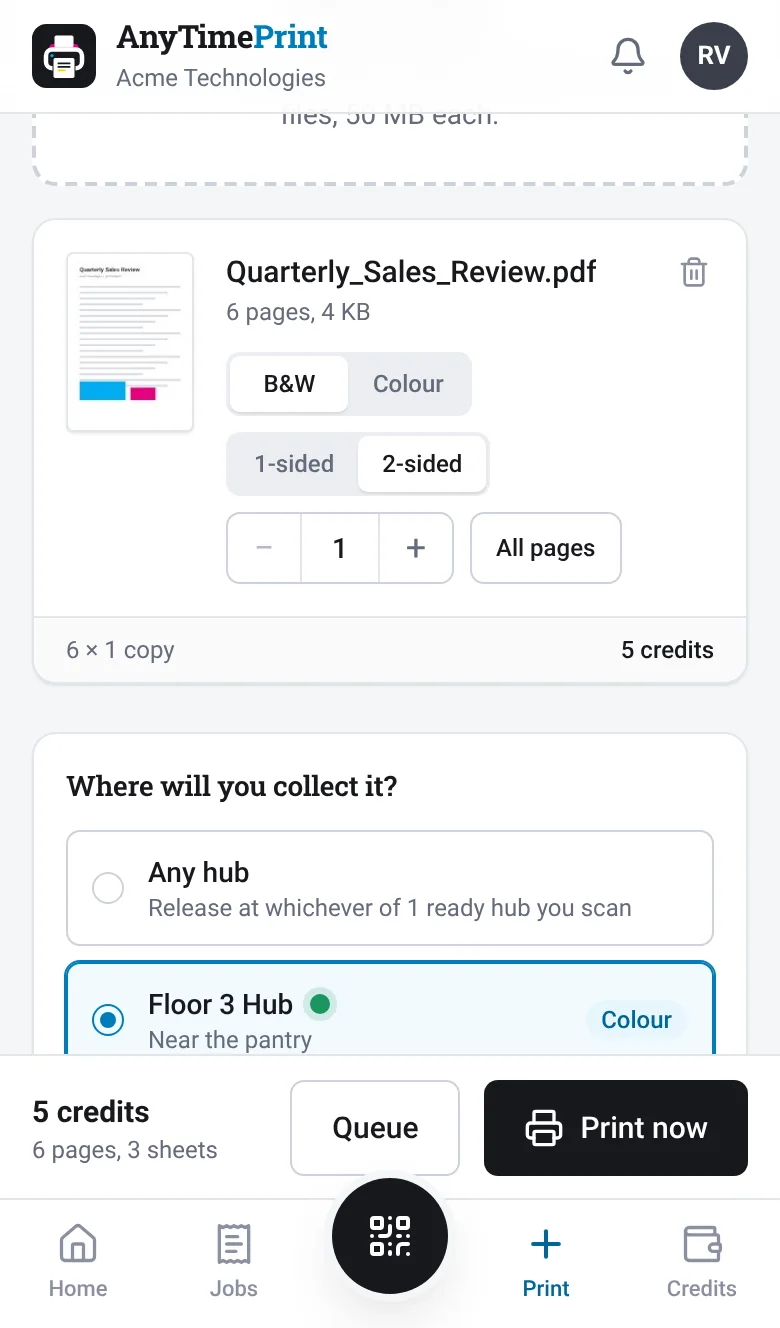
Employees
Printing feels like sending a WhatsApp message.
- Sign in with WhatsApp: no passwords to remember
- Works on any phone; add it to the home screen like an app
- Pick exact pages with a preview before printing
- PDFs, photos, and Word, PowerPoint and Excel files
- A notification when the pages are printed
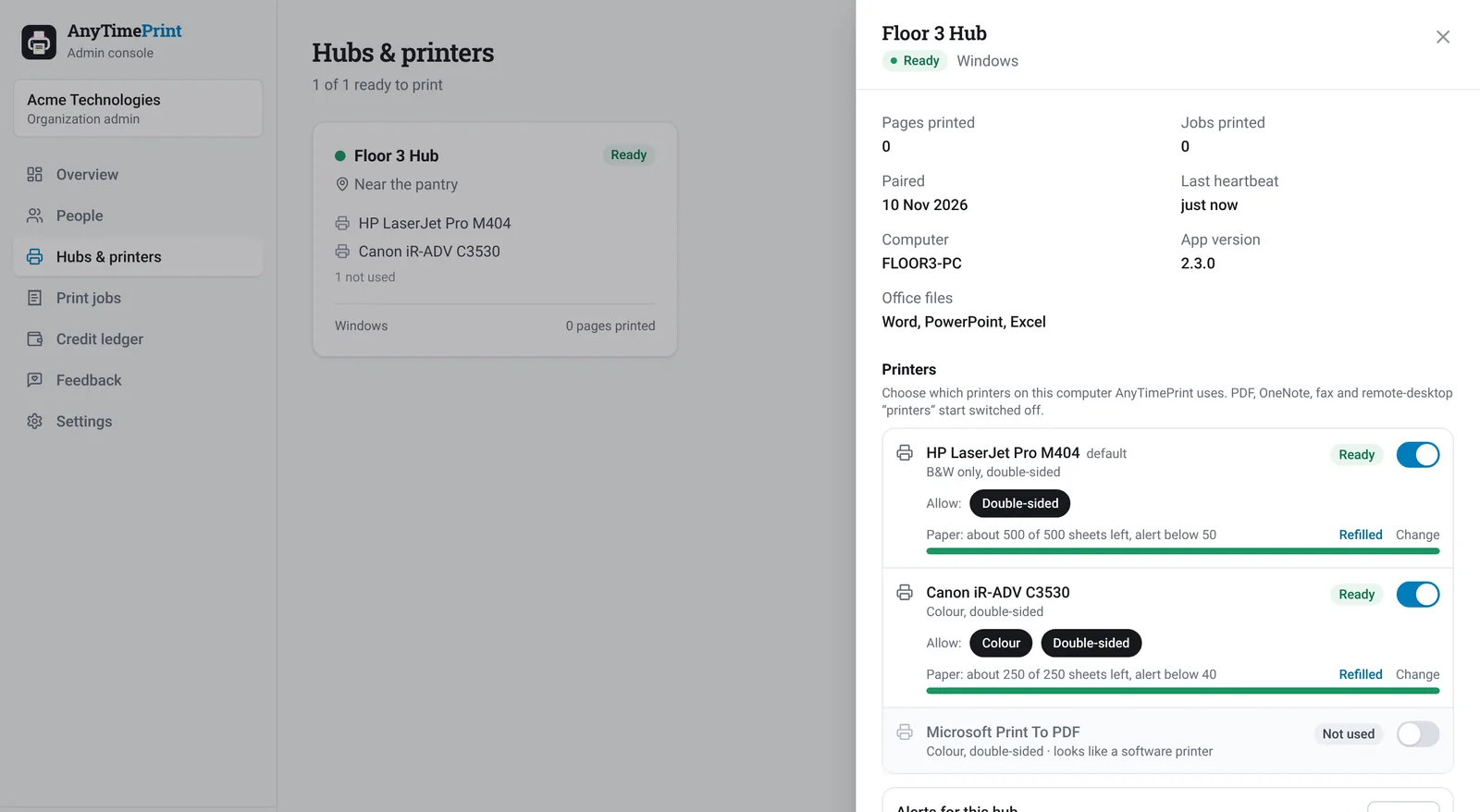
Admins and facility managers
Control without chasing people.
- Print credits per person, with your own price per page
- Limit colour, double-sided and pages per order
- Choose who can use which printers
- Paper count per printer and low-paper alerts to the person who refills it
- Live dashboard, monthly reports and CSV exports
IT teams
Nothing to install on laptops, ever.
- No print drivers or queues on employee devices
- One hub per printer area: a Windows PC, a Mac or a Raspberry Pi
- Uses the printers you already have
- Hubs pick up printers, colour and double-sided support by themselves
- Cloud-managed: add hubs and people from a browser
A hub next to the printer. No screen needed.
A hub is a small computer connected to your printers. It shows, or has stuck next to it, the QR code people scan.
Windows PC
Run the hub app on an existing office PC. It can also convert Word, PowerPoint and Excel files using your Microsoft Office.
Mac
The same hub app for macOS, with a full-screen kiosk view and live print queue.
Raspberry Pi
A palm-sized hub with no monitor at all. Stick its QR code next to the printer and you're done.
Network printers that support AirPrint or IPP Everywhere (many office printers from recent years do) work with a Raspberry Pi without any driver.
Privacy by design, not by policy
- Nothing prints until the person scans the QR at that printer and confirms
- Each organization's data is kept strictly separate
- Encrypted in transit and at rest on Google Cloud
- Documents deleted from the hub right after printing
- Hub screens show a first name and initial, never file names
Made for how Indian offices work
From IT parks to hospitals and colleges, wherever confidential pages are printed on shared printers.
Built in Hyderabad. Ready for every office in India.
AnyTimePrint Enterprise runs over your normal internet connection, so it works the same in a tech park in Bengaluru, a bank branch in Lucknow or a hospital in Kochi. We onboard teams over a video call, and a hub can be set up and paired in minutes.
- Hyderabad
- Bengaluru
- Chennai
- Pune
- Mumbai
- Delhi NCR
- Kolkata
- Ahmedabad
- Kochi
- Coimbatore
- Visakhapatnam
- Jaipur
- Chandigarh
- Indore
- Lucknow
- Bhubaneswar
Frequently asked questions
Do we need to buy new printers?
No. AnyTimePrint uses the printers you already have. The hub prints to them the way a normal computer does. With a Raspberry Pi hub, network printers that support AirPrint or IPP Everywhere work without any driver; many office printers from recent years do.
What exactly is a hub?
A small computer next to your printers that runs the AnyTimePrint hub software: an existing Windows PC, a Mac, or a Raspberry Pi with no screen. It receives documents only when someone scans its QR code and prints them. One hub can serve several printers.
Do employees install anything?
No. Employees use a web app on their phone or laptop. They can add it to their home screen, but there's nothing to download from an app store and no printer driver to install.
Why WhatsApp to sign in?
Everyone in India already has WhatsApp. People send a short code to your organization's AnyTimePrint WhatsApp number and they're signed in: no passwords to forget and no SMS delays.
Can people print Word, PowerPoint and Excel files?
Yes, if it's switched on for your organization. These files are converted to PDF on one of your Windows hubs that has Microsoft Office installed, using your own Office licence, so the layout matches what people see in Office.
What happens if the internet goes down?
Documents wait safely in the queue. Hubs reconnect by themselves and print as soon as they're back online. Uncollected documents expire and are refunded automatically.
See it print, on your own printer
We'll show you the employee app, the admin console and a hub working with a printer like yours, and answer your IT team's questions.
Or write to us at info@saola.in